
发布时间:2026-8-25
特价活动:>>>> 用友U8、T6、T+、T3软件产品4折优惠,畅捷通T+cloud、好会计、好业财、好生意云产品8折优惠,另有话费赠送。
【问题现象】
删除单据提示:存货[XXX]信息已发生修改,不允许此操作!
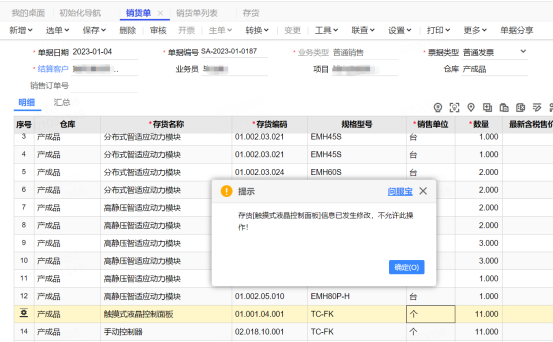
【问题原因】单据界面的销售单位和存货档案的不一致。
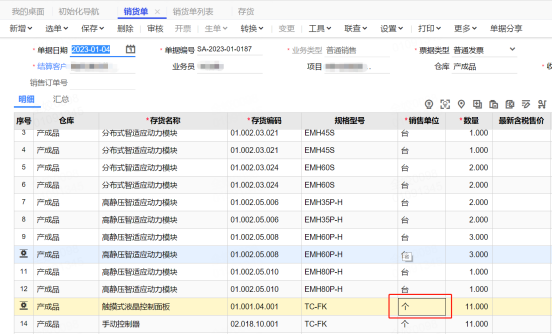
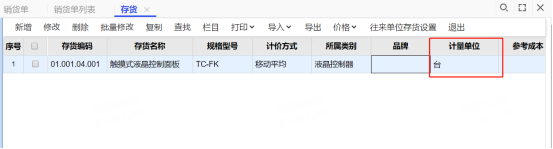
如下图:存货触摸式液晶控制面板,单据上的销售单位为个,但实际基础档案的计量单位为台
【解决方案】
1、查存货对应计量单位id
select idunit from AA_inventory where code='存货编码'
2、查存货明细在销售单明细表中id
select id from SA_SaleDelivery_b where idinventory in (select id from AA_inventory where code='存货编码') and idSaleDeliveryDTO in (select id from SA_SaleDelivery where code='单据编号')
3、更新销货单明细表中存货计量单位id
update SA_SaleDelivery_b set idunit=计量单位id where id=销货单明细id
举例:
--update SA_SaleDelivery_b set idunit=14 where id=194578
具体步骤:
1、查存货对应计量单位id
select idunit from AA_inventory where code=’存货编码’
2、查存货明细在销售单明细表中id
select id from SA_SaleDelivery_b where idinventory in (select id from AA_inventory where code='存货编码') and idSaleDeliveryDTO in (select id from SA_SaleDelivery where code='单据编号')
3、更新销货单明细表中存货计量单位id
update SA_SaleDelivery_b set idunit=计量单位id where id=销货单明细id

截屏,微信识别二维码
客服QQ:5151867
(点击QQ号复制,添加好友)