T6年结常见脚本有哪些?用友T6软件年结转脚本处理
特价活动:>>>> 畅云管家新购、续费8折优惠,畅捷通T+cloud、好会计、易代账、好业财、好生意云产品8折优惠。
请注意:执行脚本前务必备份好可用的账套数据!!!
一、建立年度账报错:
1、新建立年度帐,在工资模块表内容结转时报错。
通用脚本:
对上年的数据库执行
update WA_GZtblset Set bZxkc = 0 where bZxkc is null
2、年度帐后结转提示,委外发票没有结算
通用脚本:
对上一年数据库执行
update om_purbillvouch set ifpbalance=1 where ifpbalance<>0
3、年结存建立年度帐报错,错误编号:-2147217900 错误描述:列名'UFGUID'无效
通用脚本:
对上个年度执行下面的脚本
alter table customerclass drop column ufguid
4、建立年度账报错,对象名‘RPT_ExtColRef'无效
通用脚本:
对上个年度执行
drop table rpt_extcolref
drop table rpt_extcol
select * into Rpt_ExtColref from 正常的数据库名字..Rpt_ExtColref
select * into Rpt_ExtCol from 正常的数据库名字..Rpt_ExtCol
其中【正常的数据库名字】填写 Rpt_ExtColref 、Rpt_ExtCol 表存在的正常账套数据库名字
5、新建年度结转工资的过程中提示:结转上年出现错误,WA_JKData1 无效
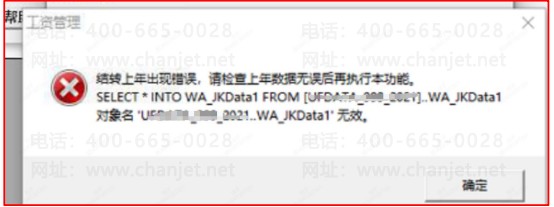
常用脚本:
对上年数据库执行
delete from dbo.WA_JKItemSet
delete from WA_JKSet
6、建立年度账提示:不能向 PrintEx 插入重复键
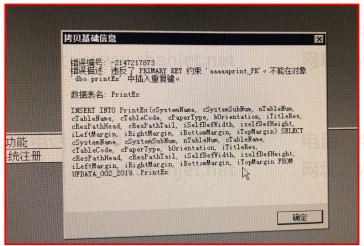
通用脚本:
对上年执行
---注意:以下是以账套号 002 为例,需要建立的是 2022 年,脚本对 2022 年执行,请修改为
实际账套号和实际年度
--1:建立临时表,把不重复的数据转存
select distinct * into A from UFDATA_002_2020..PrintEx
--2:删除原表数据
truncate table UFDATA_002_2020..PrintEx
--3:将数据导回
insert into UFDATA_002_2020..PrintEx select * from A
--4:删除临时表
drop table A
7. T6 建立年度账报错,使用年结检查有一个不能修复提示 Bank.default
通用脚本:
对上个年度执行
alter table BANK drop column [default]
8、建立年度账提示:列名’uniqueid‘无效
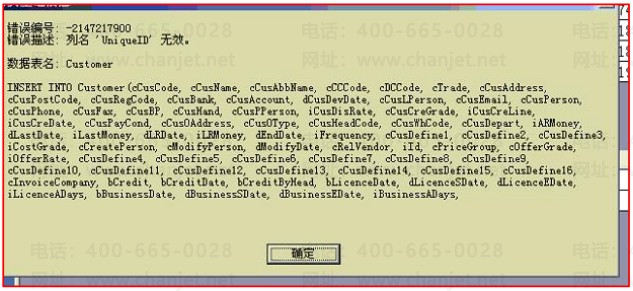
通用脚本:
对上年执行
Alter table customer add [UniqueID] uniqueidentifier null
Update customer set uniqueid = newid()
9、建立年度账提示:不能将 Null 值插入列 PayMethod
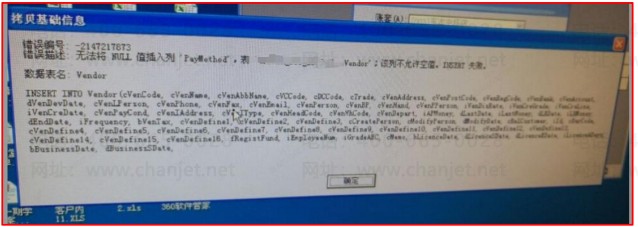
通用脚本:
对上年执行
Update vendor set paymethod = 0 where paymethod is null
10、建立年度账提示,错误编号:-2147217900 错误描述:列名'UFGUID'无效 数据表名:CustomerClass
通用脚本:
对上年执行
alter table customerclass drop column ufguid
二、结转报错
1、结转供应链时 提示 存货系统结转失败。
常用脚本:
对上年执行
update IA_Subsidiary set ioutCost=d.iUnitPrice,iAoutPrice=d.iSumfrom (select c.autoid,b.iUnitPrice,b.iSum
from SaleBillVouch a inner join SaleBillVouchs b on a.SBVID=b.SBVID inner join IA_Subsidiary c on a.SBVID=c.iPZID and b.AutoID=c.ID where iAOutPrice>1000000000) d
where
IA_Subsidiary.AutoID=d.autoid and IA_Subsidiary.iAOutPrice>1000000000
update RdRecords set iUnitCost=0,iPrice=0
where AutoID in( select id from IA_Subsidiary where iAInPrice>1000000000 )
update IA_Subsidiary set iInCost=0,iAInPrice=0 where iAInPrice>1000000000
2、结转供应链报错:执行视图 SA_SumOutQuantityNum_NS 报错
通用脚本:
对上年度执行
update RdRecords set iUnitCost =0,iPrice =0
WHERE ABS(iPrice) > 999999999994
3、结转应收应付的时候提示“系统所用部门被非法删除,不能结转上年数据”
通用脚本:
对本年执行
(1)先用用以下脚本检查下是否有些部门在上年度存在,但新年度中不存在的情况:
select * from department where cdepcode not in (select cdepcode from 上年数据库名
字.department);
--其中【上年数据库名字】改成账套上年的数据库名字
(2)语句查找出哪个部门不存在,就在新年度中增加该部门档案
(3)增加部门档案后重新年结。
三、反年结
1、固定资产反年结(工具无法选择 20 年以后的年度)
通用脚本:
update ufsystem..ua_account_sub set bClosing=0 where cacc_id=' 账 套 号 ' and
csub_id='FA' and iyear = 反年结的年度
其中 账套号改成实际的账套号、反年结年度改成对应需要反年结的年度
2、上度账启用了某模块,但年度结转后想反启用
通用脚本:
模块反启用需要在数据为中执行,执行语句前修改 cacc_id 为账套编号,UFdata_001_2022
为用户需要反启用的账套库,执行前请备份所有账套数据,以免执行到其他账套中:
——库存
Update ufdata_001_2022..accinformation set cvalue='cdefault' where csysid='st'and ctype='ddate'
Delete ufsystem..ua_account_sub where cacc_id='001' and csub_id='st'and iyear='2022'
Delete ufsystem..ua_account_sub where cacc_id='001' and csub_id='st'and iyear='9999'
~~~~~~~~~~~~~~~~~~~~~~~其他模块反启用语句~~~~~~~~~~~~~~~~~~~~~~~~~
——应收
Update ufdata_001_2022..accinformation set cvalue='cdefault' where csysid='ar'and ctype='ddate'
Delete ufsystem..ua_account_sub where cacc_id='001' and csub_id='ar' and iyear='2022'
Delete ufsystem..ua_account_sub where cacc_id='001' and csub_id='ar' and iyear='9999'
——应付
update ufdata_001_2022..accinformation set cvalue='cdefault'wherecsysid='ap'and ctype='ddate'
delete ufsystem..ua_account_sub where cacc_id='001' and csub_id='ap' and iyear='2022'
delete ufsystem..ua_account_sub where cacc_id='001' and csub_id='ap' and iyear='9999'
——采购
update ufdata_001_2022..accinformation setcvalue='cdefault'where csysid='pu'and ctype='ddate'
delete ufsystem..ua_account_sub where cacc_id='001'andcsub_id='pu'andiyear='2022'
delete ufsystem..ua_account_sub where cacc_id='001'andcsub_id='pu'andiyear='9999'
——销售
update ufdata_001_2022..accinformation set cvalue='cdefault'wherecsysid='sa'and ctype='ddate'
delete ufsystem..ua_account_sub where cacc_id='001'and csub_id='sa'and iyear='2022'
delete ufsystem..ua_account_sub where cacc_id='001'and csub_id='sa'and iyear='9999'
——核算
update ufdata_001_2022..accinformation set cvalue='cdefault'where csysid='ia'and ctype='ddate'
delete ufsystem..ua_account_sub where cacc_id='001'and csub_id='ia'and iyear='2022'
delete ufsystem..ua_account_sub where cacc_id='001'and csub_id='ia'and iyear='9999'
——固定资产
update ufdata_001_2022..accinformation set cvalue='cdefault'where csysid='fa'and ctype='ddate'
delete ufsystem..ua_account_sub where cacc_id='001'and csub_id='fa'and iyear='2022'
delete ufsystem..ua_account_sub where cacc_id='001'and csub_id='fa'and iyear='9999'
3、核算模块取消期初年结过来的数据
通用脚本:
对新年执行(记得备份)
delete from IA_Subsidiary where iMonth = 0
delete from IA_Summary where iMonth = 0
4、工资模块上年需要反年结
通用脚本:
对上年执行
Update wa_account set ilastmonth=11 where cgzgradenum='工资类别编号'
Update gl_mend set bflag_wa=0 where iperiod=12
其中工资类别编号改成对应的编号
对系统库执行
update UFSystem..ua_account_sub set bClosing='0' where cacc_id='账套号' and iYear=' 年度'
其中【账套号】改成实际账套号,【年度】那里改成反年结的那个年度
四、其他
1、清除异常互斥
通用脚本:
对账套对应年度执行
delete from UFSystem..UA_task
delete from UFSystem..UA_TaskLog
delete from UFSystem..UA_Log
delete from GL_mccontrol
delete from GL_mvcontrol
delete from GL_mvocontrol
delete from LockVouch
delete from fa_Control
2、12 月底做结算成本处理,提示结算单号为:XXX.存货编码为:XXX 的存货暂估处理失败
通用脚本:
通过脚本修改入库调整单最大单据号即可。(001 为账套号,2022 为年度)
Update UFSystem..ua_identity set ifatherid=(select max(id) from UFDATA_001_2022..justinvouch)
,ichildid=(select max(autoid) from UFDATA_001_2022..justinvouchs)
where cacc_id='001' and cvouchtype = 'ju'
3、查询年结前后,上个年度存在,而下个年度不存在的存货编码
通用脚本:
对上个年度执行
select cinvcode as 存货编码 from customer Where cinvcode not in
(select cinvcode from ufdata_账套号_下个年度..inventory) group by cinvcode
其中【账套号】、【下个年度】按照实际去修改
4、年结后,特殊行业性质无法结转损益(工具 20 年以后无法使用)
通用脚本:
UPDATE GL_CodeClass SET bcheck=1 WHERE cclass IN ('收入','支出','收入费用') AND
itrade IN (SELECT itrade_id FROM GL_BTrade WHERE ctrade_name='行业性质')


